
Redesigning a pediatric management system to reduce cognitive load and improve clinical workflows
Through field observations, interviews and usability research, I redesigned the core workflows of a hospital management system, improving efficiency, accessibility and long-term scalability.
Outcomes
Reduced patient waiting times
Faster administrative workflows
Improved accessibility
My role
Product Designer
Team
2 people
Tech stack
Figma | Docs
FigJam
Deadline
6 Weeks
Context
Programed is a scheduling and patient management platform used in pediatric wards.
Doctors and administrative staff relied on it every day to schedule appointments, monitor patients and update medical records.
Although the system worked, years of incremental changes created usability issues that slowed down daily work.
Design process
Research
Field observations
User interviews
User Personas
Critical User Journeys
Benchmark
Define
Problem statement
User needs
Product / business needs
Desgin principles
Prototype
User flows
Wireframes
Low Fidelity prototypes
Validation
Stakeholder feedback
Internal reviews
Behavior observation
Moderated usability testing
Final Design
High Fidelity UI
Design System
Accessibility
Documentation
Developer handoff
Research
Goal
Understand why medical staff experienced unnecessary friction during daily workflows.
Field observations
We observed doctors and administrative staff using the platform during real appointments.

User Interviews
Interviwed medical and administrative staff to understand their mental model and what they need from the product on a daily basis.
Insights
Administrative staff
If I click the wrong patient, I have to start over and book on overtime
Administrative staff
After several hours using the software I get headaches.
Medical staff
Finding previous information takes too long.
User personas


Definition
Critical User Journeys
Mapped out the main user journeys on for our users in order to identify problems and where to solve them.
Appointment management
Administrative staff
Users need to:
Book new appointments
Edit schedule for modifications
Manage patient information
Patient evolution
Healthcare professional
Users need to:
Review past information
Track key metrics
Input new information
Access information about family members
Problem Statement
The platform performed well functionally, but didn't allow for recovery from errors and everyday workflows contained unnecessary friction that increased task completion time, caused user frustration and reduced operational efficiency.
Design principles
Ui must keep in mind that users will use the software daily for 8hs shitfts.
Recovery path
Allow users to make mistakes and recover from them
Cognitive load
Reduce unnecesary friction and allow for a more pleasing experience
Consistency
Make interactions feel natural and similar to what the users already know
Original software
Focuses only on the happy path.
Provides no mechanism for error recovery.
Disallows cancellations.
Prevents rescheduling.
Information is poorly sorted
Lack of visual hierarchy
Re-design
Provide recovery paths
Allow for editing schedules
Information architecture properly sorted
Applied hierarchy
Ideation
User Flow redesign

Original flow

Re-designed flow
Wireframe exploration
Explored and tested multiple approaches before selecting the final solution.

Key Design Decisions
These were the most relevant changes that led us closer to our goals
Unified appointment screen
Before
Multiple screens, search filters and clicks.
After
Single workflow showing information all the time
Recovery from mistakes
Before
A mistake means start over and overbook appointments
After
Edit in place without changing screens
Accessibility
Before
Visual noise, incosistency, small font sizes, lack of hierarchy, too much plain white.
After
Low saturation colors and high contrast within elements
Large typography
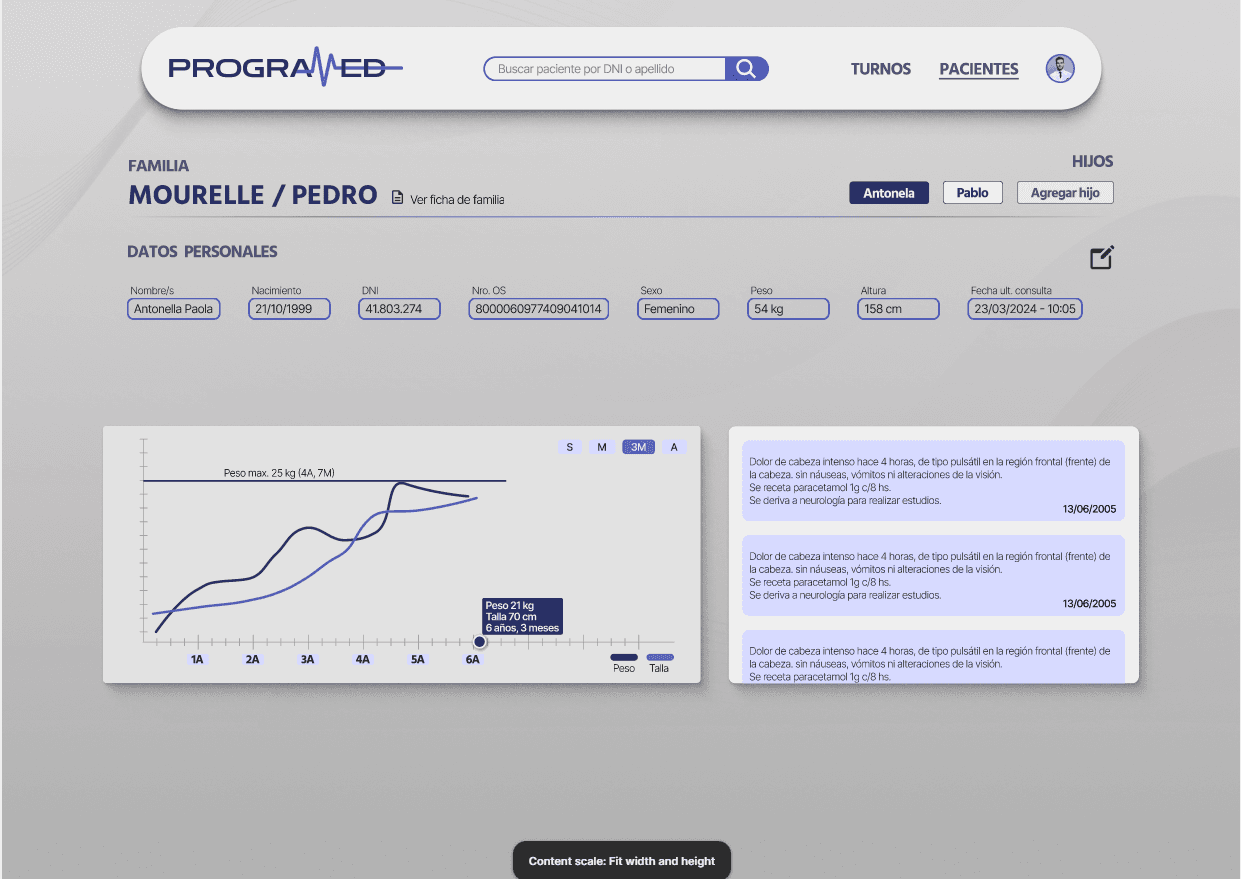
Patient evolution
Before
Text only, impossible to scan
After
Applied visual hierarchy and added charts for better scanability
Scrollable clinic history
Hand-off
Final UI


Design tokens and atomic UI
Created a design system based on that years material design guidelines and documented color, font, gaps and padding usage within the project.
Created complex components applying atomic design principles to ensure consistency

Final Outcome
Reduced patient waiting times
Faster administrative workflows
Improved accessibility
Reflections & learnings
How I'd Improve It Today
The redesign solved the immediate usability problems.
Today I'd also think about how the product could evolve over several years.
Examples:
Permission system
Audit logs
Notification center
Custom dashboards
Saved filters
Mobile companion experience
The goal would be creating a platform rather than solving isolated screens.

