Product Design Challenge
Role
Product Designer
Timeline
2 Days
Tools
Figma · FigJam
Type
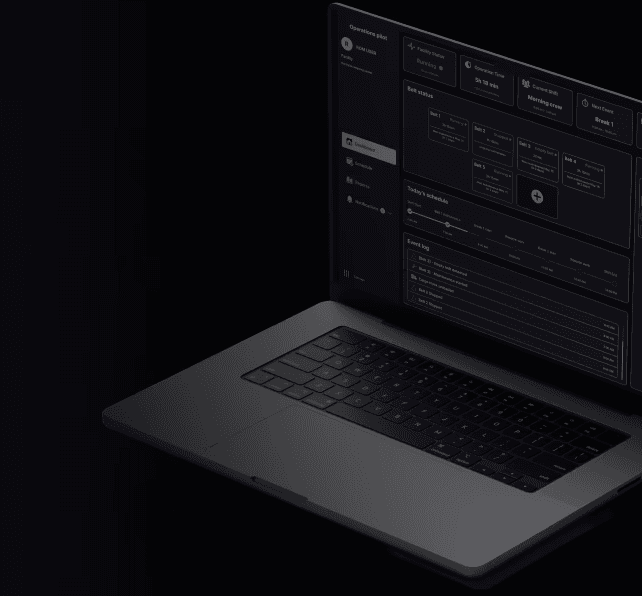
Product Design Challenge
Appendix / Process
My design approach
A compact view of the methods and deliverables behind the case study.
Understand
Understanding all the moving parst of the challenge
Understand how the product works
Understand what the users need
Identify coinstrains
Define
How may I solve this problem?
Fundamental features
Jobs to be done
User flows for each task
Design and iterate
Wireframe, test, iterate, polish
Create multiple options
Test and iterate
Polish and scalable design
Appendix / Process
Design Process Timeline
A compact view of the methods and deliverables behind the case study.
Discovery
Business Understanding
User Analysis
Information Architecture
Wireframes
Iterations
Design System
High Fidelity
Methods & Deliverables
✓
Product Discovery
✓
Business Analysis
✓
User Analysis
✓
Jobs To Be Done
✓
User Flows
✓
Information Architecture
✓
Feature Prioritization
✓
Wireframes
✓
Iterative Design
✓
Component Library
✓
Design System
✓
Dashboard Design
✓
Accessibility Considerations
✓
Product Thinking
01 / Context
The Challenge
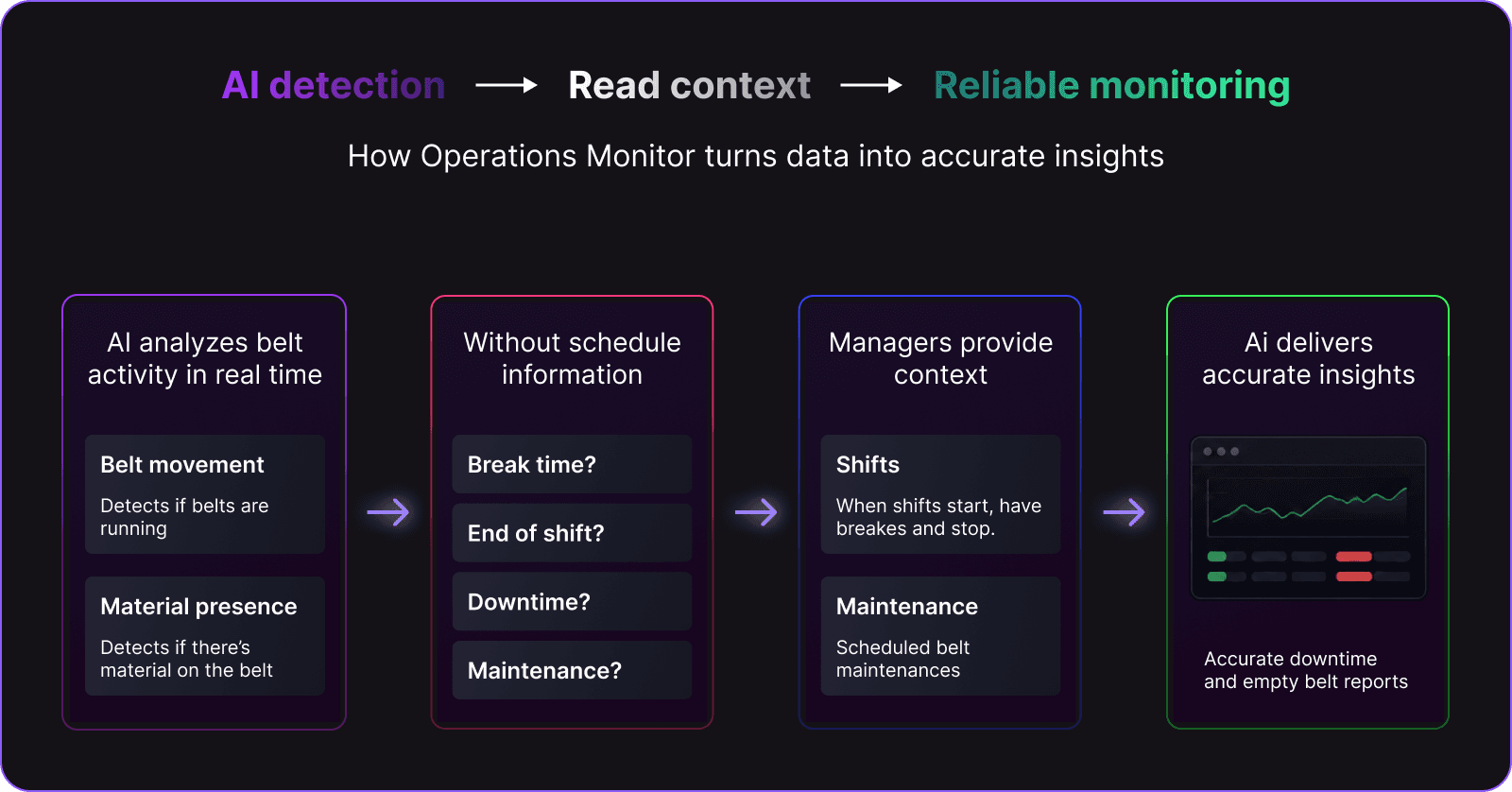
Operations Monitor is an AI-powered monitoring platform used in recycling facilities. The system can detect conveyor movement and material presence, but it cannot distinguish operational downtime from scheduled stops without user-defined schedules.
The challenge was to design an intuitive scheduling experience that lets Operations Managers configure shifts quickly while minimizing errors and cognitive load.
Schedules are not employee rosters. They are the operational context the AI needs to tell downtime, empty-belt time, planned breaks, maintenance, and unexpected interruptions apart.
If schedule information is missing, accurate monitoring becomes impossible.
02 / Constraints
Product Constraints
The design had to respect the realities of industrial operations before it could add interface polish.
Accurate schedules
AI depends on accurate schedule information to classify activity correctly.
Different shift structures
Facilities operate with different shift structures and recurring patterns.
Operational, not employee, schedules
Managers configure facility operations, not individual worker rosters.
Trustworthy reporting
Missing information creates false downtime reports and reduces confidence in metrics.
Fast edits
Operational changes happen frequently, so edits must be immediate and low risk.
03 / Discovery
Understanding the Operator
The experience is shaped around the person who must understand what is happening now and change the plan without losing trust in the data.
Jobs To Be Done
Configure recurring schedules
When configuring facility schedules, I want reusable shift templates so recurring work takes only a few clicks.
Understand today’s plan
When monitoring operations, I want schedule context to remain visible so I can distinguish planned stops from problems.
Correct exceptions instantly
When reality changes, I want a fast edit path so the system keeps reporting what actually happened.
Operations Manager
Goals
Monitor facility health, maintain accurate schedules, and react quickly to exceptions.
Responsibilities
Coordinate shifts, maintenance windows, breaks, and operational changes.
Pain point
Too much configuration work happens before the value of the system is visible.
Contextual modes
Plan for the future, imporivse on present problems and fix any past mistakes, so the metrics gathered by the AI are accurate and allow for a better desicion making.
User Flow maps

04 / Product Assumptions
Designing Within the Unknown
This project was completed as a design challenge, so the product assumptions needed to be explicit instead of hidden behind visual polish.
✓
Recurring schedules are common.
✓
Templates reduce repetitive work.
✓
Managers rarely edit individual workers.
✓
Unexpected events should be editable instantly.
✓
Schedule information should remain visible while monitoring operations.
05 / Product Definition
Defining the Solution
A lightweight architecture that makes today, future planning, and corrections feel like connected parts of one operational system.
Information Architecture
Three time horizons, one operational loop
The product architecture follows how an Operations Manager thinks: understand what is happening now, plan what comes next, and correct what already happened.
Operations Monitor
operational system
01 / TODAY
MONITOR
Dashboard
See the live state of the facility at a glance.
Facility status
Current shift
Event log
Quick actions
02 / FUTURE
PLAN
Schedule View
Turn recurring work and changes into a plan.
Calendar
Shift templates
Exceptions
Notifications
03 / PAST
CORRECT
History / Corrections
Make the record trustworthy when reality changes.
History
Corrections
Reports
Source synthesis: Today → Dashboard · Future → Schedule View · Past → History / Corrections
Feature Prioritization
Protect the operational loop first
The first release is intentionally biased toward the actions that keep the facility running. Everything else remains visible, but clearly sequenced.
SHIP NOW
Must Have
Directly supports monitoring, planning, and fast operational corrections.
01
Shift Templates
02
Calendar
03
Exceptions
04
Quick Actions
05
Today’s Schedule
LATER LAYER
Nice to Have
Valuable extensions that improve efficiency or governance after the core loop is stable.
01
Recurring Holidays
02
Bulk Editing
03
Permissions
04
Analytics
Release logic
Monitor → plan → correct → extend
The product grows around the operational loop, not beside it.
06 / Wireframes
From Structure to Screen


07 / Key Design Decisions
The Decisions That Shaped the Product
Each decision connects a user problem to a product response, so the final interface reads as a consequence of the thinking behind it.
Templates instead of manual scheduling
Problem
Managers repeat the same schedules every week.
Solution
Created reusable templates that can be assigned to multiple days.
Impact
Reduced repetitive work and minimized configuration errors.
Faster planning with fewer configuration errors.
Separate operational monitoring from schedule editing
Problem
Monitoring requires constant visibility while schedule editing is occasional.
Solution
Dashboard and Calendar became independent sections connected through shared information.
Impact
Reduce cognitive load and separates information according to the user's needs in context of use
Better information display, better decisions.
Quick actions
Problem
Unexpected operational changes happen frequently.
Solution
Common actions such as overtime and maintenance became one-click actions.
Impact
It improves efficiency in updating the facility status and allows the manager to focus on problem-solving
Quicker actions means mannagers can use their attention where it matters the most
Timeline instead of forms
Problem
Managers think chronologically.
Solution
Events are displayed as a timeline instead of isolated inputs.
Impact
Gives a sense of progression and allows managers to quickly see if events are going as planned.
Clearer information allow to easily mannage work-load
Card-based dashboard
Problem
Operators need information at a glance.
Solution
Small cards communicate operational state without overwhelming the screen.
Impact
A predictable and repetitive structure makes the product easy to scan and learn.
Easier learning curve means happier mannagers
08 / Design System
Designing the Language
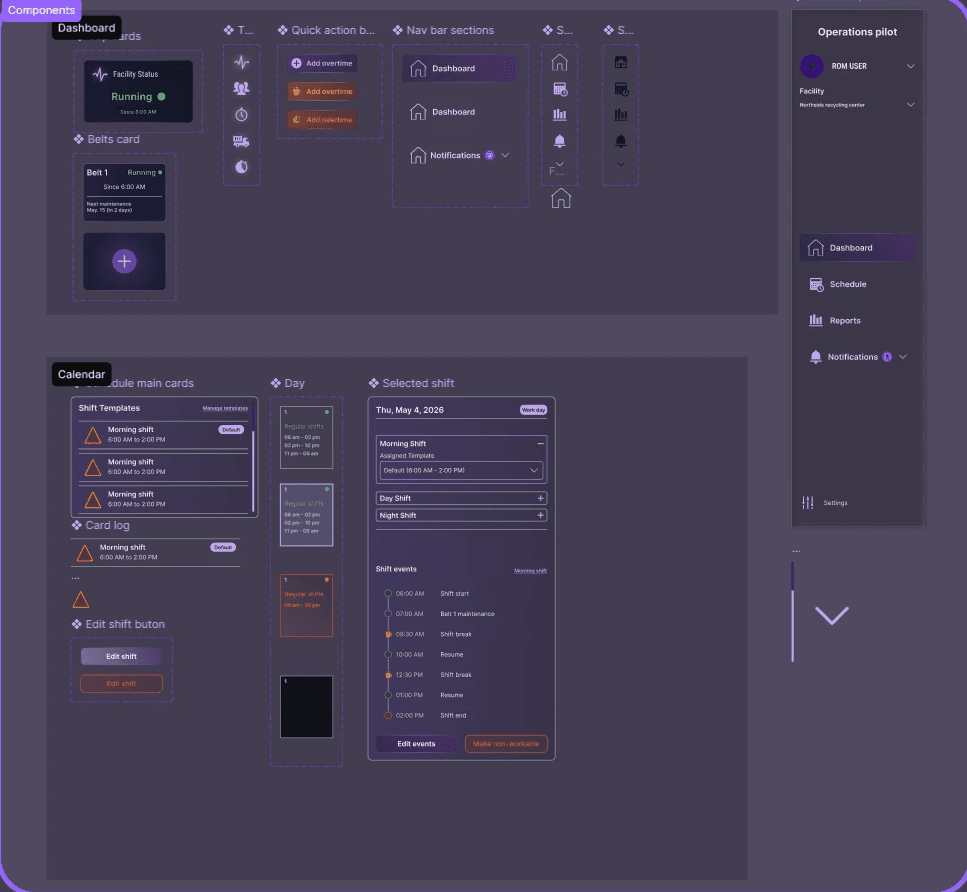
A compact visual system keeps the operational UI calm, legible, and consistent across dark mode, dense data, and responsive layouts.
Color palette
High contrast for reading, purple only for emphasis and semantics for states
Typography
Roboto condensed / 700 / 48
Inter / 400 / 18
Inputs · Cards · Status · Navigation
09 / Final Solution
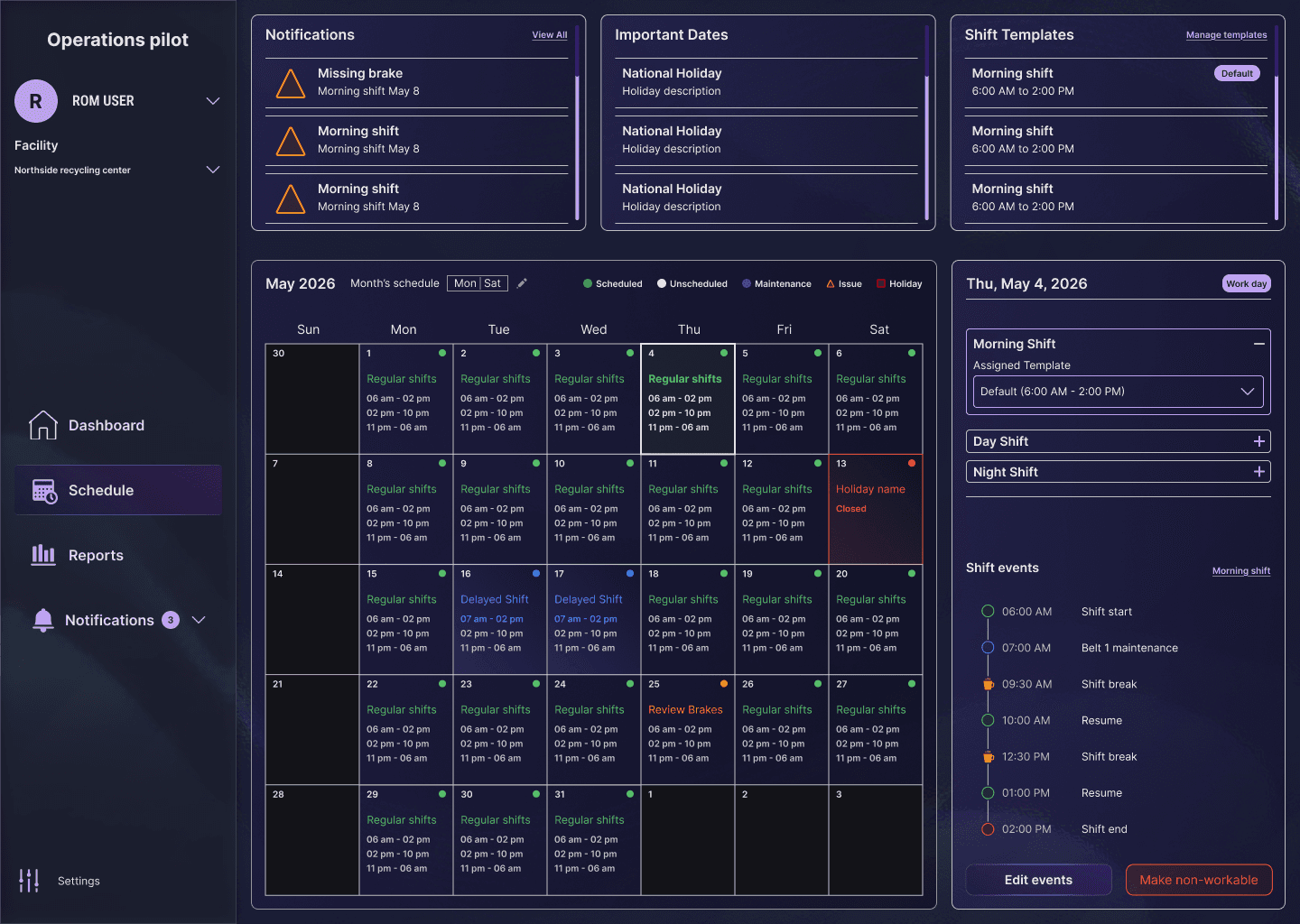
The Final Solution
A focused showcase of the product surfaces that make the operational model tangible.
10 / Reflection
What I’d Carry Forward
The work is strongest when the interface reduces uncertainty instead of simply adding more capability.
What I’d Improve
Recurring holidays · Permissions · Multiple facilities · Predictive scheduling · Calendar analytics · Bulk editing
Key Learnings
Designing operational software is not about adding features. It is about reducing uncertainty. Understanding business constraints before designing interfaces produced better solutions than focusing on UI first.
The best operational interface makes the next decision feel obvious without pretending the system is simple.